
Joins!
Did you notice the exclamation point? This is because joins are very important. If you are going to work data with SQL you will need to learn joins.
Joins are where two tables are combined on a row by row basis. Often we need to combine data to meet the needs of our end users. Joining two tables together can be done is several different ways. The four most important are cross joins, full outer joins, inner joins, left joins, and right joins. Full outer joins are sometimes just called full joins or outer joins.
The Demo Tables
For this page we are going to create two very simple tables called left_table and right_table. The code for creating the tables and loading the data is on the bottom of the page.
Cross Joins
A cross join is when all of the records from the left table are matched with the records on the right table. For most join operations only the rows that are related to each other should be combined. For example, if one table contains student demographics and another table has awards only the correct student records need to be matched to the correct award records. But a cross join doesn't do that. It just matches all of the records regardless of it being approriate.
Consider the following two tables. Each column has only two columns. The first column is an ID number. The other value is an alphanumeric value.
| Left ID | Left Value |
|---|---|
| 1 | 1 Alpha |
| 1 | 1 Beta |
| 2 | 2 Solo |
| 3 | 3 Alpha |
| 3 | 3 Beta |
| 4 | 4 Solo |
| 5 | 5 Solo |
| Right ID | Right Value |
|---|---|
| 3 | 3 Only |
| 4 | 4 Only |
| 5 | 5 First |
| 5 | 5 Second |
| 6 | 6 First |
| 6 | 6 Second |
| 7 | 7 Only |
With a cross join every row in the left table is individually matched to each row in the right table.
Cross Join Example
| Left ID | Left Value | Right ID | Right Value |
|---|---|---|---|
| 1 | 1 Alpha | 3 | 3 Only |
| 1 | 1 Alpha | 4 | 4 Only |
| 1 | 1 Alpha | 5 | 5 First |
| 1 | 1 Alpha | 5 | 5 Second |
| 1 | 1 Alpha | 6 | 6 First |
| 1 | 1 Alpha | 6 | 6 Second |
| 1 | 1 Alpha | 7 | 7 Only |
| 1 | 1 Beta | 3 | 3 Only |
| 1 | 1 Beta | 4 | 4 Only |
| 1 | 1 Beta | 5 | 5 First |
| 1 | 1 Beta | 5 | 5 Second |
| 1 | 1 Beta | 6 | 6 First |
| 1 | 1 Beta | 6 | 6 Second |
| 1 | 1 Beta | 7 | 7 Only |
| 2 | 2 Solo | 3 | 3 Only |
| 2 | 2 Solo | 4 | 4 Only |
| 2 | 2 Solo | 5 | 5 First |
| 2 | 2 Solo | 5 | 5 Second |
| 2 | 2 Solo | 6 | 6 First |
| 2 | 2 Solo | 6 | 6 Second |
| 2 | 2 Solo | 7 | 7 Only |
A cross join of the two example tables results in 49 records. I'm not going to duplicate them all here. Instead this is the records with a left table ID value of 1 or 2. We can see the two left join records have been multiplied ten times to match them against the 10 records in the right table.
All joins are multiplicative. The number of records in the output of a cross join are easy to calculate. Just multiply the number of records for each table. This can lead to an exponential increase in output records. If you cross join three tables of 1,000 records each the output will be 1,0003 = 1,000,000,000 records.
When writing queries it is important to get at least a rough idea of how many records will be in the final output. Running a query that returns a large data set can cause a database server to slow until your query is completed. I you run an extensive query on a production server the server may slow down causing systems to slow or stop. This could make you pretty unpopular.
If you run a huge query on a data warehouse you may cause the warehouse to slow but that will not effect the production server. That is one of the reasons we have data warehouses, to isolate end user queries from the production server.
Cross Join Summary
A cross join has the following attributes.
- All data from the left table will be represented in the output.
- All data from the right table will be represented in the output.
- Each row from the left table will be matched to each row on the right table and added to the output.
- There is no attempt to logically relate the data between the input tables. The output may not make logical sense.
- No null values will be created by the join process.
Full Outer Joins
Full outer joins are often called just an outer join or a full join.
A full join can be conceptualized as a cross join but with the non-logical rows removed and the rows with no matching data added.
To manually create a full join we would first do a cross join.
Second, remove the non-logical rows. In our example tables we do that by removing the rows where the left table ID does not match the right table ID.
Third, add to the output rows on the tables that have no matching rows. Since the rows have no matching rows from the opposite table the columns provided by the opposite table will be null values. This is why it is called an outer join. With an outer join the data that does not match to opposite table (outside of the data with commonality) will still be represented in the output.
Full Outer Join Example
| Left ID | Left Value | Right ID | Right Value |
|---|---|---|---|
| 1 | 1 Alpha | ||
| 1 | 1 Beta | ||
| 2 | 2 Solo | ||
| 3 | 3 Alpha | 3 | 3 Only |
| 3 | 3 Beta | 3 | 3 Only |
| 4 | 4 Solo | 4 | 4 Only |
| 5 | 5 Solo | 5 | 5 First |
| 5 | 5 Solo | 5 | 5 Second |
| 6 | 6 First | ||
| 6 | 6 Second | ||
| 7 | 7 Only |
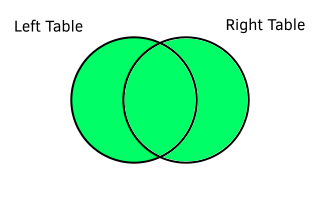
Full Outer Join Summary
A full outer join has the following attributes.
- The join requires a key value column for each table.
- All data from the left table will be represented in the output.
- All data from the right table will be represented in the output.
- Data from the left table with no match to the right table will have nulls for the right data columns.
- Data from the right table with no match to the left table will have nulls for the left data columns.
- Rows from the left table that match to multiple rows on the right table will be multiplied to match the right table rows.
- Rows from the right table that match to multiple rows on the left table will be multiplied to match the left table rows.
Left Joins
A left join is the same as a full outer join except the records from the right table that do not match to the left table are not included.
Left Join Example
| Left ID | Left Value | Right ID | Right Value |
| 1 | 1 Alpha | ||
| 1 | 1 Beta | ||
| 2 | 2 Solo | ||
| 3 | 3 Alpha | 3 | 3 Only |
| 3 | 3 Beta | 3 | 3 Only |
| 4 | 4 Solo | 4 | 4 Only |
| 5 | 5 Solo | 5 | 5 First |
| 5 | 5 Solo | 5 | 5 Second |
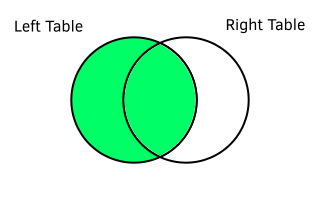
Left Join Summary
A left join has the following attributes.
- The join requires a key value column for each table.
- All data from the left table will be represented in the output.
- Data from the left table with no match to the right table will have nulls for the right data columns.
- Data from the right table with no match to the left table will not be included in the output.
- Rows from the left table that match to multiple rows on the right table will be multiplied to match the right table rows.
- Rows from the right table that match to multiple rows on the left table will be multiplied to match the left table rows.
Right Joins
A right join is the same as a left join but the situation is reversed
Right Join Example
| Left ID | Left Value | Right ID | Right Value |
| 3 | 3 Alpha | 3 | 3 Only |
| 3 | 3 Beta | 3 | 3 Only |
| 4 | 4 Solo | 4 | 4 Only |
| 5 | 5 Solo | 5 | 5 First |
| 5 | 5 Solo | 5 | 5 Second |
| 6 | 6 First | ||
| 6 | 6 Second | ||
| 7 | 7 Only |
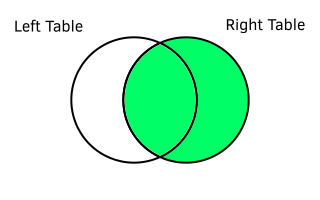
Right Join Summary
A right join has the following attributes.
- The join requires a key value column for each table.
- All data from the right table will be represented in the output.
- Data from the right table with no match to the left table will have nulls for the left data columns.
- Data from the left table with no match to the right table will not be included in the output.
- Rows from the left table that match to multiple rows on the right table will be multiplied to match the right table rows.
- Rows from the right table that match to multiple rows on the left table will be multiplied to match the left table rows.
Inner Joins
Inner joins only include records that match between the tables. It is logically the same as a cross join with key values that do not match removed.
Inner Join Example
| Left ID | Left Value | Right ID | Right Value |
|---|---|---|---|
| 3 | 3 Alpha | 3 | 3 Only |
| 3 | 3 Beta | 3 | 3 Only |
| 4 | 4 Solo | 4 | 4 Only |
| 5 | 5 Solo | 5 | 5 First |
| 5 | 5 Solo | 5 | 5 Second |
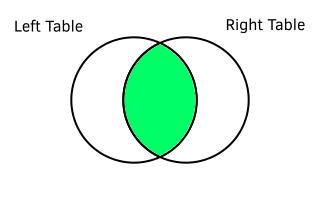
Inner Join Summary
An inner join has the following attributes.
- The join requires a key value column for each table.
- Only rows that match to a record on the opposite table will be included.
- Rows from the left table that match to multiple rows on the right table will be multiplied to match the right table rows.
- Rows from the right table that match to multiple rows on the left table will be multiplied to match the left table rows.
- Data from the left table with no match to the right table will not be included in the output.
- Data from the right table with no match to the left table will not be included in the output.
- No nulls will be introduced due to to the join process.
Join Example Tables SQL
/*
The left table has IDs from 1 to 5.
The right table has IDs from 3 to 7.
This means IDs 1 and 2 only exist on the left table and 6 and 7 only exist on the right table.
*/

CREATE TABLE IF NOT EXISTS left_table (
	"Left ID" int,
	"Left Value" char(1)
);

/*
IDs with two rows have values marked "Alpha" and "Beta".
IDs with only one row have values marked "Solo".
*/

INSERT INTO left_table VALUES
(1, '1 Alpha'),
(1, '1 Beta'),
(2, '2 Solo'),
(3, '3 Alpha'),
(3, '3 Beta'),
(4, '4 Solo'),
(5, '5 Solo');

CREATE TABLE IF NOT EXISTS right_table (
	"Right ID" int,
	"Right Value" char(1)
);

/*
IDs with two rows have values marked "First" and "Second".
IDs with only one row have values marked "Only".
*/

INSERT INTO right_table VALUES
(3, '3 Only'),
(4, '4 Only'),
(5, '5 First'),
(5, '5 Second'),
(6, '6 First'),
(6, '6 Second'),
(7, '7 Only');